


Matomo stack is a set of applications, built around the web analytics platform Matomo (formerly Piwik Analytics) as the main application. By default, Matomo stack includes the following apps: Matomo, Nginx web server, PHP, MySQL database, Redis cache, RabbitMQ.
What is Matomo
The latest version of the web analytics platform Matomo is already available for quick deployment on TryDirect. The platform, positioning itself as an ethical alternative of Google Analytics, is an open-source product, granting 100% data ownership and privacy protection. It fully complies with such privacy conventions as GDPR, PECR, CCPA and HIPAA.
Who is using Matomo
The Matomo platform is used both by individuals and companies representatives, working as:
- Marketers
- Web Developers
- Business analysts
- Data analysts
- Data Security Officers
What are the benefits of using Matomo
- Web and mobile analytics
- Conversion Optimization features (Heatmaps, Session Recording, AB Testing
- Funnels, Form Analytics)
- Visitor Profiles
- Tag Manager
- No data limits
- No data sampling
- White label reporting and custom-designed inter
Extensions and plugins
- You have an option of choosing WAF / ModSecurity for Nginx. In this case, the Nginx web server compiled with the ModSecurity module will be installed. There is also a preinstalled list of rules - OWASP CRS (ModSecurity Core Rule Set) Version 3.
- Matomo analytics can be enhanced through the integration with over 100 plugins from the Open Marketplace, such as Cohorts, IP2Proxy, WooCommerce Analytics, Activity Log, Tracker Js Cdn Sync and many more.
- You can benefit from the best of over 100 Matomo Integration plugins like Joomla, WordPress, Drupal, SparePoint and others for CMS, frameworks, forums, online shops and many more.
Matomo can be installed on a single physical server or a VPS virtual private server, as specified by the indicator at the bottom right on the TryDirect deployment settings page.
The platform supports servers behind proxies, works in a load-balanced architecture, and supports IPv4 and IPv6 addresses.
The installer will be available at the IP address that you will receive immediately after the installation is complete. You can find the “IP” in the “User info & SSH Access” section of the email.
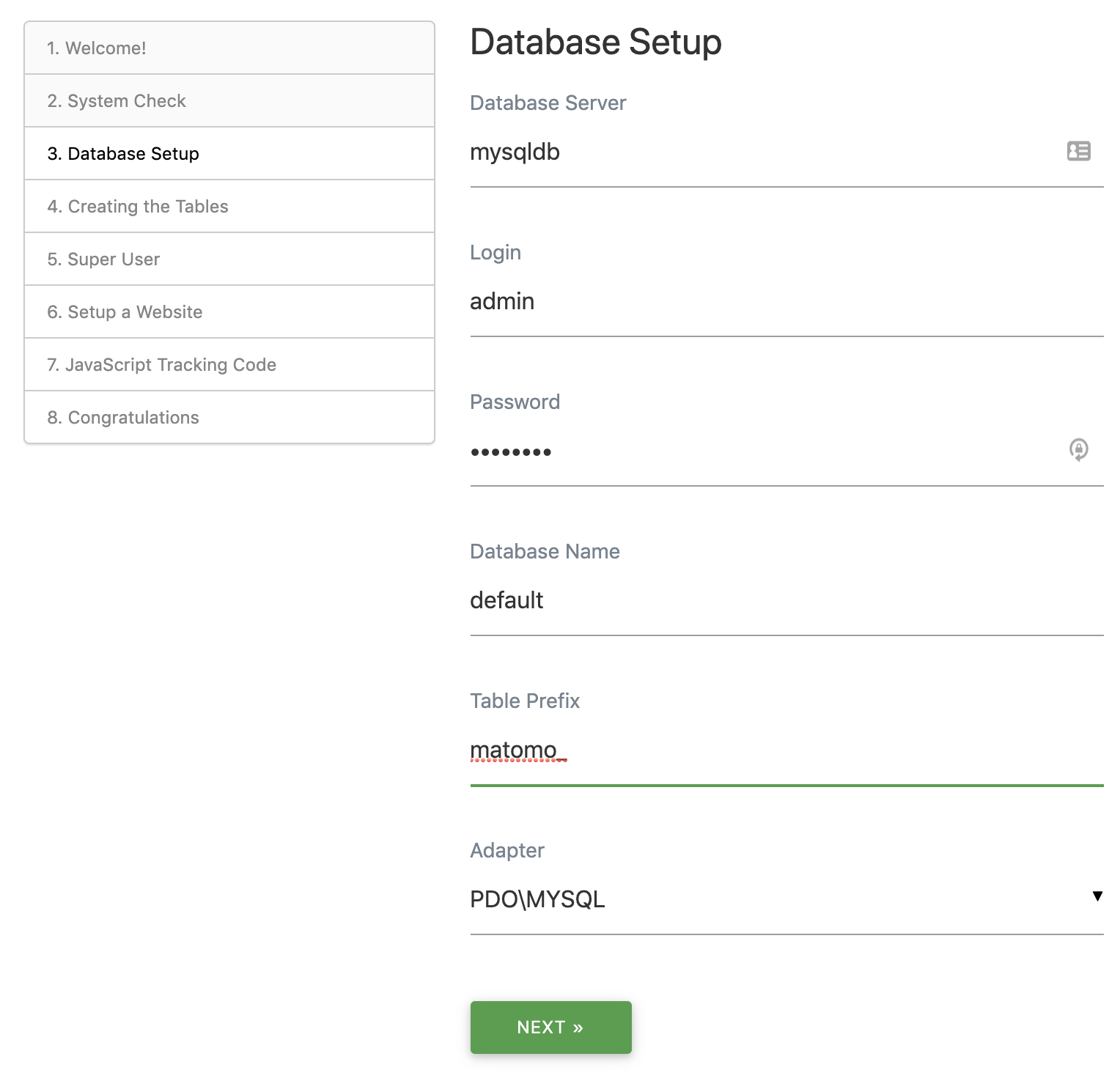
Example: Database setup
Replace default database settings with the settings from email.
MYSQL_HOST: mysqldb
MYSQL_PORT: 3306
MYSQL_USER: admin
MYSQL_DATABASE: default
MYSQL_PASSWORD: b1r1G1z2
So Instead of 127.0.0.1 put “mysqldb”, see below
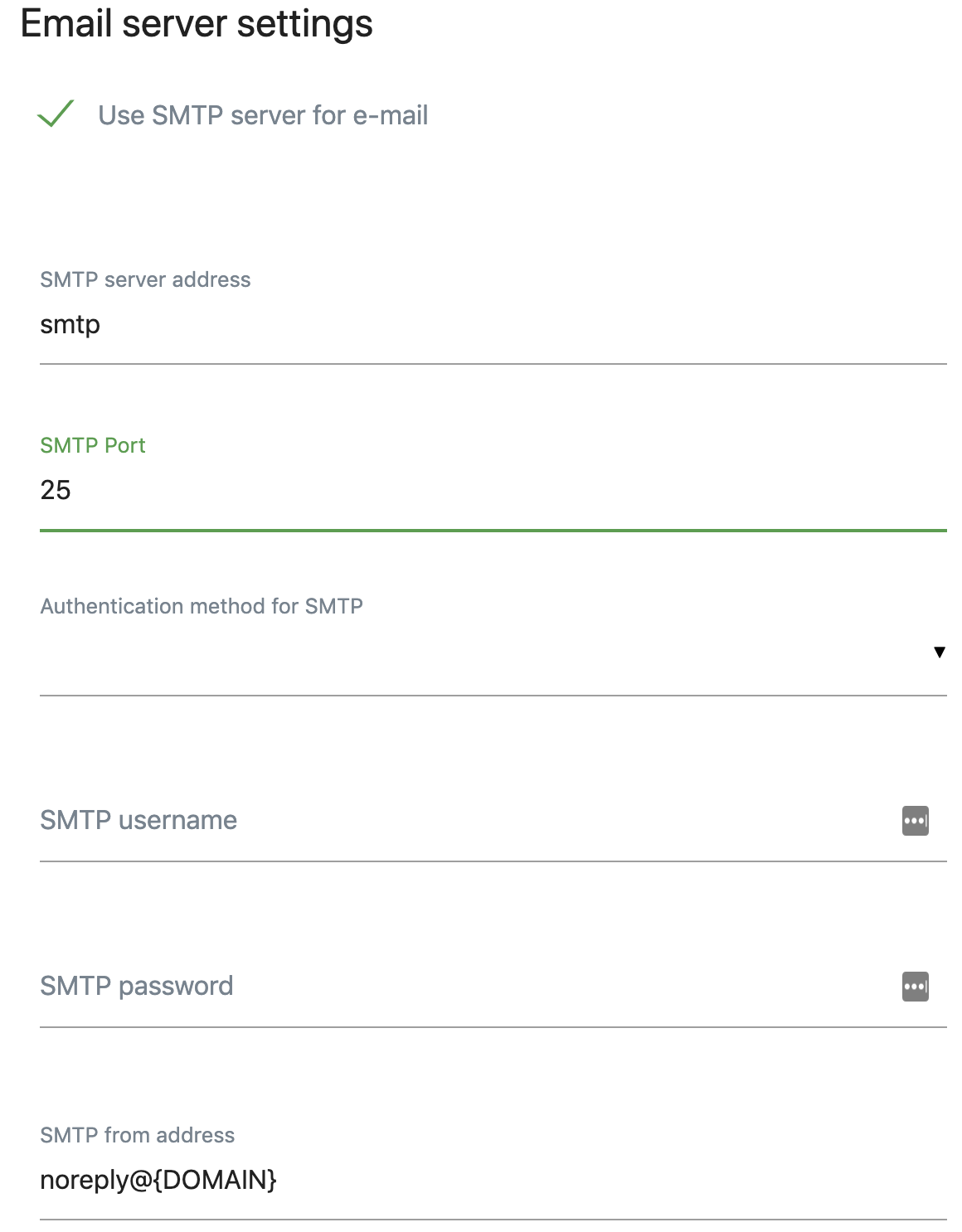
When all steps complete, log into Matomo admin dashboard, find System -> General Settings -> Email Server Settings and enter the following:
NUMBER OF SERVERS REQUIRED:
Single VPS server
Companion apps

Nginx

Deploy WAF/ModSecurity for Nginx compiled with ModSecurity module + predefined OWASP CRS ( ModSecurity Core Rule Set) Version 3

knockd is a port-knock server. It listens to all traffic on an ethernet (or PPP) interface, looking for special knock sequences of port-hits. A client makes these port-hits by sending a TCP (or UDP) packet to a port on the server. This port need not be open -- since knockd listens at the link-layer level, it sees all traffic even if it's destined for a closed port. When the server detects a specific sequence of port-hits, it runs a command defined in its configuration file. This can be used to open up holes in a firewall for quick access.

Get the easiest way to manage your MySQL server by including phpMyAdmin within the current deployment. Easily pause or stop phpMyAdmin container later.

Fail2ban scans log files and bans IPs that show the malicious signs. Highly recommended for simple VPS server setup

Portainer is a lightweight management UI which allows you to easily manage your different Docker environments (Docker hosts or Swarm clusters)

Real-time performance monitoring, done right!
Netdata positions itself as an alloy of the best features that the paid infrastructure monitoring solutions and open-source tools have. Its multifunctionality, velocity, and ease of use make it secure, reliable, and scalable. This tool enables you effortlessly perform your infrastructure slowdowns and anomalies, troubleshooting, and overall system monitoring with little to no configuration.

Minimal docker container management panel. Allows you to check the status and logs of all services of this stack. It also simplifies SSL setup and configuration.